
On this page
62 percent of higher education admissions teams report inefficiencies that cause delays and missed chances. Most of those inefficiencies are not missing features. They are manual handoffs: details retyped between a CRM, an email tool and the student system.
Integrating a CRM into the admissions process is how teams remove them. This guide explains what a CRM for admissions should connect to, and gives seven steps to integrate it without disrupting the intake cycle. If you are still deciding whether to change your CRM, start with our 6 Warning Signs post, and for the strategies it supports, our Top 10 Student Recruitment Strategies.
Quick answer
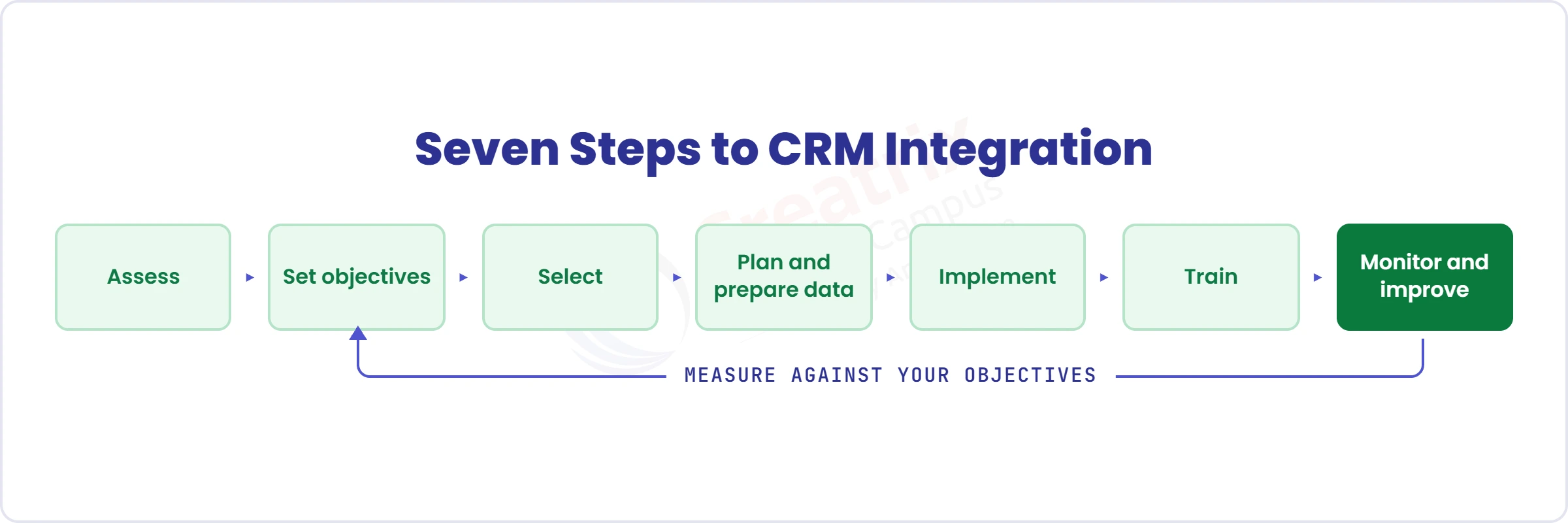
Integrating a CRM for admissions means connecting enquiries, applications, documents, communication and decisions in one workflow that continues into the student record. Done well, it follows seven steps: assess the current process, set measurable objectives, select the CRM, plan data and integrations, implement, train the team, and monitor and improve.
Article summary
This guide covers what CRM integration for admissions means, how to map your workflow and set objectives before choosing software, and seven steps to select, integrate, roll out and improve it.
Key takeaways
- A CRM for admissions manages every interaction from first enquiry to enrollment, but its value depends on what it connects to.
- Map your current workflow before choosing software, so you know where the integration points and inefficiencies are.
- Set measurable objectives, such as shorter processing times or better conversion, so you can tell whether it worked.
- Integrate in phases, test at every rollout, and treat data security and governance as part of the plan.
- The integration should end in the student record, not stop at the application.
What CRM Integration for Admissions Means
A CRM for admissions manages and tracks every prospective student interaction, from first enquiry to enrollment. Automation handles repetitive tasks, so the team has more time to engage meaningfully. Nothing slips through the cracks between application, status updates and documents, and real-time data shows what is working.
Integration is what makes that value real. A CRM that exchanges data with the systems around it, such as the student information system and email platforms, keeps information flowing from department to department and prevents data silos.
The test is simple: when a detail changes in one place, does it change everywhere?
Before You Choose: Assess and Set Objectives
Step 1: Assess your current admissions process
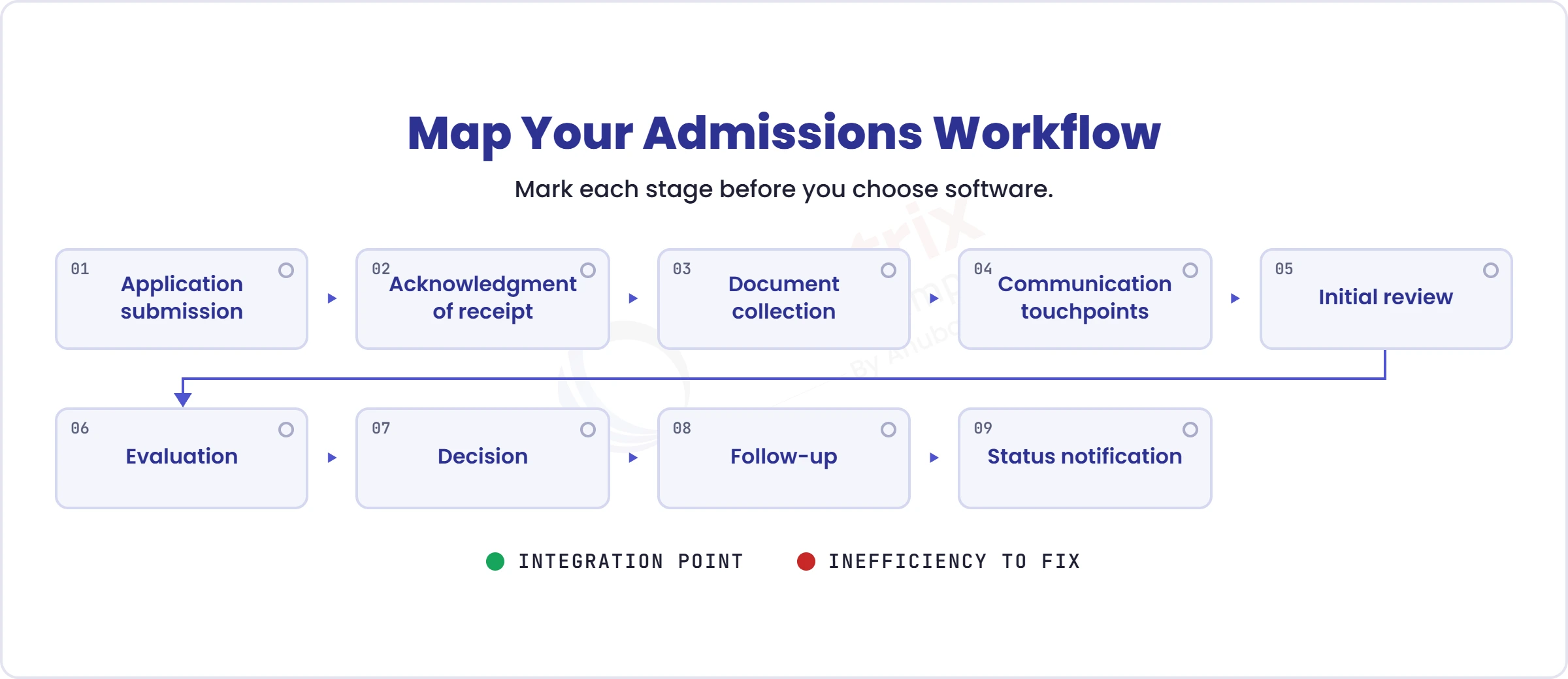
Take a step back and look at what works and what does not. Document every stage: application submission, acknowledgment of receipt, document collection, communication touchpoints, initial review, evaluation, decision and follow-up. Ask your admissions team and your applicants where the bottlenecks are, and note delays in communication, manual data entry and document verification, and confusion caused by disjointed messages from different departments.
A workflow map you can copy
Fill one row per stage. The pain-point column becomes your objectives.
| Stage | Owner | System today | Handoff | Typical delay | Pain point |
| Document collection | Admissions officer | Email and shared drive | Applicant to officer | Days waiting for missing items | No alert when a document is missing |
Step 2: Set clear, measurable objectives
Decide what the CRM is for: better communication with applicants, fewer mundane tasks, or a better-routed student journey. Then attach numbers, such as reducing application processing time by 30 percent or improving conversion rates by 10 percent. A CRM can resolve many of the problems you mapped: automatic emails at funnel stages for faster response, triggers and reminders for missing documents, and eligibility reviewed against predefined criteria.
From vague goal to measurable objective
- “Improve communication” becomes “send an acknowledgement within minutes of submission and a status update at every stage change”.
- “Reduce manual work” becomes “handle each document once, not several times”.
- “Improve conversion” becomes “raise the share of started applications that are submitted, tracked weekly by programme”.
Select, Integrate and Improve
Step 3: Select the right CRM
Step 4: Plan the integration and prepare your data
Step 5: Implement
Step 6: Train and onboard staff
Step 7: Monitor, evaluate and improve
Track how quickly the CRM handles tasks and how well it supports applications. Review with the people who use it, and measure against your Step 2 objectives. A simple rhythm helps: two weeks for adoption and issues, day 30 for processing time and data accuracy, day 60 for conversion by stage, and day 90 to compare results with your objectives and adjust.
A 90-day review rhythm
Two weeks: adoption and issues. Day 30: processing time and data accuracy. Day 60: conversion by stage. Day 90: compare results with the Step 2 objectives and adjust.
Common pitfalls
Choosing software before mapping the process. Migrating dirty data. Integrating in one direction only. Skipping training. Having no owner after go-live.
| Claim | What it might actually cover | What to ask instead |
| “Integrates with your systems” | A one-way export or a nightly file | Ask whether data flows both ways, and whether an accepted offer creates the student record |
| “Secure by design” | A general security statement | Ask about encryption, role-based access, audit trails and where the data is stored |
| “Quick to implement” | A template that does not match your workflow | Ask how your own admissions stages are configured, and who maintains them |
Where Creatrix Campus Fits
The integration question has two answers. If you already run a CRM you value, Creatrix Connect links non-Creatrix systems such as your SIS and CRM, and admissions takes over from application onward through a governed handoff.
If you want one flow, Creatrix Campus Admissions CRM is native: leads, campaigns, enquiries and nurturing; applications, documents, decisions and offers; then acceptance and enrollment, with the student record created from the same data.
Creatrix holds ISO/IEC 27001:2022 and ISO 27701:2019 and supports GDPR, with data residency where your regulator requires it.
Conclusion
Integrating a CRM into admissions is less about software than about handoffs. Map them, set objectives, connect the systems in phases, and keep measuring.
If you want to see how Creatrix Campus connects your admissions journey to the student record, talk to us about a Tailored Proof Session.
Quick recap
Seven steps: assess, set objectives, select, plan and prepare data, implement, train, then monitor and improve. End the integration in the student record, not at the application.
Frequently asked questions
What is a CRM for admissions?
How do you integrate a CRM into an admissions process?
What should an admissions CRM integrate with?
How do you measure whether CRM integration worked?
How does Creatrix Campus handle CRM integration?
Join the conversation
Want to contribute?
We welcome thought leaders to share ideas and write for our blog.
Become a guest author