
On this page
Two courses can run on the exact same LMS license, at the exact same institution, this exact term. In one, the system hosts a syllabus uploaded in August and a gradebook updated in December, while the actual teaching happens over email threads and photocopied handouts. In the other, content, discussion, quizzes, and mobile access are all doing real work every week.
Both of those courses count, on paper, as "the institution has an LMS." Only one of them is getting anything out of the fifteen features a vendor listed in their sales deck. That gap between deployed and actually used is the part most feature checklists never mention.
This matters because most LMS buying decisions still get framed as a features comparison: does it have mobile access, does it have analytics, does it support blended learning. Almost every serious vendor can check every box. The question that actually predicts whether an institution gets value is different: does a given feature change what faculty and students do every week, or does it sit in the product unopened.
Quick answer
The must-have features of a cloud LMS for higher education, content management, assessment tools, mobile access, and engagement analytics, only create value if they change weekly behavior for faculty and students. A feature that exists on a checklist but goes unopened delivers the same result as not having it at all. The real evaluation question is what habit each feature is meant to create, not whether the capability is present.
Article summary
The case for evaluating an LMS beyond its feature list rests on three things: why a fully-featured system can still sit unused in a meaningful share of courses, what the Online Learning Consortium's decades of work on online learning quality suggest about what actually predicts adoption, and what to check for so a feature investment turns into a weekly habit rather than an unopened dashboard.
Key takeaways
- Two courses on the same LMS license can use it in wildly different ways, from a digital filing cabinet to a fully worked teaching environment.
- A feature that exists but goes unopened, like an engagement dashboard nobody checks, produces the same result as not having the feature at all.
- The Online Learning Consortium has operated continuously since 1999 as a professional community focused specifically on the quality of online and blended teaching, not just the availability of tools.
- Mobile access, content management, and assessment tools only matter if they replace an existing habit, emailed handouts, a paper sign-in sheet, a manual gradebook, not if they sit beside it.
- The institutions that get real value from an LMS evaluate for adoption and habit change, not for how many boxes get checked on a features spreadsheet.
The Feature Nobody Opens
Every LMS procurement process eventually produces a spreadsheet: fifteen or twenty features down one side, vendors across the top, checkmarks in between. It's a reasonable way to narrow a shortlist. It's a poor way to predict adoption, because a checkmark says a capability exists, not that anyone will use it.
Engagement analytics is the clearest example. Nearly every modern LMS includes some version of it: flags for students who haven't logged in, early-warning indicators, participation dashboards. Whether that feature does anything depends entirely on whether an instructor opens the dashboard and acts on what it shows. A feature nobody opens produces exactly the same institutional outcome as a feature that was never built.
Deployed Versus Actually Used
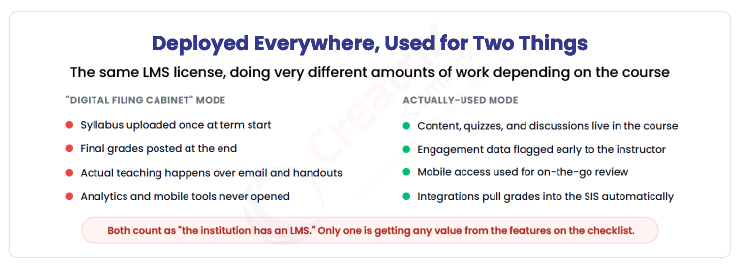
The gap between these two modes rarely comes down to the software itself. Both instructors have access to the same fifteen features. What differs is whether the LMS became the actual place teaching happens, or a compliance requirement layered on top of teaching that still happens somewhere else.
The Online Learning Consortium has spent since 1999, when it began as the Sloan Consortium, building a community specifically focused on the quality of online, blended, and digital teaching and learning, not simply the deployment of tools, per OLC's own site. That an entire professional field has organized around quality, rather than just adoption of software, is a signal that having the tool was never the hard part. Getting it actually used well is.
This is why two institutions can report the identical LMS platform and see completely different outcomes. The software isn't the variable. What replaced what is.
What Separates a Feature From a Habit
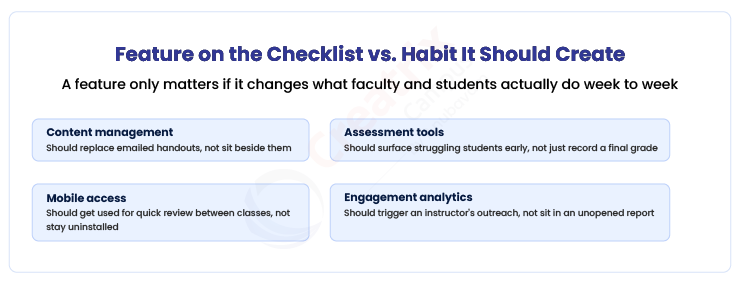
| Feature | What it should replace | What it becomes if unused |
| Content management | Emailed handouts and photocopies | A digital copy of the syllabus, nothing else |
| Assessment tools | A paper gradebook with no early signal | A place final grades get typed in once, at the end |
| Mobile access | Waiting until a laptop is available to check anything | An app installed and never opened |
| Engagement analytics | Guessing which students are falling behind | A dashboard that exists but nobody checks |
Framed this way, the evaluation question changes. Instead of asking whether a vendor has assessment tools, the question becomes whether the assessment tools are built to surface a struggling student early enough for an instructor to act, and whether that action is easy enough that it becomes routine rather than exceptional.
The institutions that get this right tend to treat LMS rollout as a change-management project, not a software installation. The feature list gets the institution to a shortlist. What happens in the first term of actual use decides whether it was worth buying.
Where Creatrix Campus Fits
Creatrix Campus's LMS is built around the features that tend to actually get used: content that replaces emailed handouts rather than duplicating them, assessment tools that surface a struggling student early enough to matter, mobile access built for genuine on-the-go use, and engagement data that reaches an instructor's attention rather than sitting in an unopened report.
Because the LMS shares data with the institution's student information and registration systems, grades and engagement signals reach the people who need them without a separate export or manual step, which is often the quiet reason a feature goes unused in the first place: it required one extra step nobody had time for.
Conclusion
A features checklist can narrow a shortlist of LMS vendors. It cannot tell you whether the institution will actually use what it bought. That answer depends on whether each feature replaces an existing habit, emailed handouts, a paper gradebook, guesswork about who's falling behind, or simply sits next to it, unopened.
Institutions that evaluate an LMS by asking what habit each feature is meant to create tend to get real adoption. The rest get a fully-featured product that quietly becomes a digital filing cabinet in half their courses.
If you want to see how Creatrix Campus's LMS is built for actual weekly use, not just a features list, talk to us about our cloud LMS for higher education.
Quick recap
The must-have features of a cloud LMS only create value when they replace an existing habit, emailed handouts, a paper gradebook, guesswork about struggling students, rather than sitting unused beside it. Institutions should evaluate an LMS for adoption and weekly behavior change, not for how many boxes get checked on a features list.
Frequently asked questions
What are the must-have features of a cloud LMS for higher education?
Why do some courses barely use their LMS despite having full access to its features?
How should engagement analytics in an LMS actually be used?
What should institutions evaluate beyond an LMS features list?
How does Creatrix Campus's LMS support real adoption?
Join the conversation
Want to contribute?
We welcome thought leaders to share ideas and write for our blog.
Become a guest author