
On this page
Every institution running a legacy, on-premise system knows, in general terms, that it should probably move to the cloud eventually. Almost none of them treat it as urgent. The system still runs. IT still patches it. Nobody has had a catastrophic failure yet. "Eventually" quietly turns into years.
The case for cloud-based education platforms usually gets made on cost and convenience: lower total cost of ownership, remote access, less server maintenance. Those are real advantages, but they rarely create urgency on their own, because the legacy system, however creaky, still technically works today.
A cloud-based education platform should deliver more than cost savings. Why institutions keep delaying a migration that most already agree is inevitable, and what to look for when finally evaluating the move, is where the real decision lives.
Quick answer
A cloud-based education platform is higher education software hosted and maintained by the vendor rather than run on an institution's own servers, typically offering lower upfront infrastructure cost, remote and mobile access, and automatic updates. The case for moving to one is strongest not on cost alone, but on risk: legacy on-premise systems carry slowly growing exposure to security gaps, vendor support that eventually ends, and staff dependency on institutional knowledge that walks out the door when someone leaves.
Article summary
Two related questions define cloud adoption in higher education: what a cloud-based platform should actually deliver, and why institutions keep delaying the move away from legacy, on-premise software even when they know they should make it. Together, they make the case that the real driver for migration is risk management, not just lower server costs.
Key takeaways
- The case for cloud platforms is usually framed around cost, but the more urgent case is risk: aging security patches, ending vendor support, and staff dependency on undocumented legacy systems.
- Legacy system risk accumulates quietly and rarely creates urgency until a security incident, a vendor end-of-life notice, or a staffing gap forces the issue.
- A genuine cloud-based education platform should deliver automatic updates, real mobile and remote access, and elastic capacity, not just a hosted copy of the same legacy software.
- Internet2, the nonprofit network and cloud services consortium built specifically for research and education institutions, exists because cloud adoption in this sector has enough specific requirements, security, identity management, dedicated bandwidth, that generic commercial cloud tools do not fully address on their own.
- The institutions that migrate successfully evaluate for what happens after the move, updates, scaling, and support, not just the cost of the migration itself.
What Is a Cloud-Based Education Platform?
A cloud-based education platform is higher education software that runs on the vendor's infrastructure rather than an institution's own servers, accessed over the internet rather than through a local network. In practice, this typically means lower upfront hardware cost, since the institution is not buying and maintaining servers, remote and mobile access for staff, faculty, and students, and updates that the vendor rolls out rather than the institution's own IT team scheduling and applying.
Not every "cloud" product delivers all of this equally. Some vendors simply host a legacy application on rented servers, a lift-and-shift, without redesigning it for elastic scaling, mobile use, or continuous updates. That still counts as cloud-hosted in a technical sense, but it does not deliver the operational benefits institutions are usually looking for when they consider a migration.
A genuinely cloud-native platform should scale capacity up during peak periods (registration week, exam periods) without manual intervention, push security and feature updates without requiring institutional IT to schedule downtime, and provide the same functionality whether a user is on a campus desktop or a personal phone off campus.
Why Institutions Delay Migrating Off Legacy Software
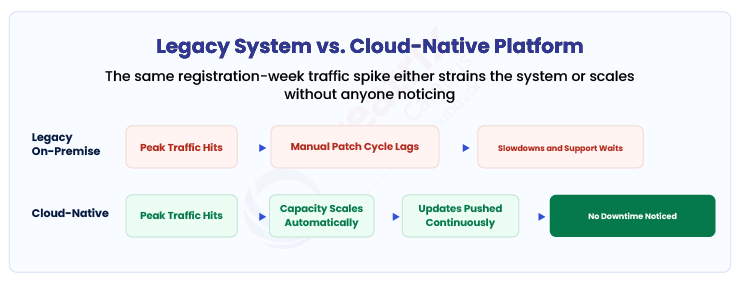
Here is the honest reason most institutions delay a cloud migration: the legacy system, however old, is still running today. There is no burning platform forcing the decision, only a vague sense that it should probably happen at some point. Budget cycles favor the visible cost of a migration project over the invisible, accumulating cost of staying put.
That invisible cost is real. Vendors eventually stop prioritizing support and security patches for aging on-premise products, sometimes announcing formal end-of-life dates, sometimes just quietly slowing the pace of updates. Staff who understand a legacy system's specific configuration and workarounds are often close to retirement, and the institutional knowledge they carry rarely gets fully documented before they leave. Security patches that once arrived within days can start taking weeks, widening the window an aging system is exposed.
Internet2, the nonprofit network and cloud services consortium built specifically for research and education institutions, offers NET+ Cloud Services in partnership with providers including AWS and Google Cloud, and operates what it describes as the nation's largest and fastest research and education network, per Internet2's own site. An organization built specifically around higher education's cloud and networking needs exists because generic commercial cloud tools do not fully address the sector's specific requirements, security, identity management, dedicated research bandwidth, on their own. That same specificity is exactly what a legacy on-premise system was never built to keep up with as those requirements evolve.
EDUCAUSE, the nonprofit association with more than 100,000 individual members and 2,100 member institutions focused on the use of technology and data in higher education, reflects a related pattern, per EDUCAUSE's own site: institutions keep needing outside research and benchmarking on IT modernization, which suggests that deciding when and how to migrate off legacy systems is a genuinely hard, ongoing question for most of the sector, not one that resolves itself with time.
What to Look For When Evaluating a Cloud Migration
Every vendor pitching a cloud migration can point to lower server costs and remote access. That is the easy sell. It is not the whole evaluation.
| Approach | What it looks like in practice | What it costs the institution later |
| Stay on legacy, on-premise software | Familiar system, in-house IT manages patches and uptime | Security patches slow down over time, vendor support eventually ends, staff dependency on undocumented workarounds |
| Lift-and-shift to hosted servers | Lower hardware cost, same application, fewer real gains | Still lacks elastic scaling, mobile-first design, and continuous update cycles |
| Cloud-native platform built for elastic scale and continuous updates | Automatic capacity scaling, vendor-managed security updates, real mobile access | Requires more upfront evaluation of the vendor's actual architecture, not just its marketing claim of being "cloud-based" |
If the goal is only to reduce server hardware costs, a lift-and-shift will do. If the goal is to actually reduce security and staffing risk, the evaluation needs a harder question: does this platform get security and feature updates continuously, without requiring the institution's own IT team to schedule and apply them.
| Capability | Why it matters | What to ask a vendor |
| Continuous security updates | Legacy systems fall behind on patches as vendor support winds down; cloud platforms should not | Ask how often security updates are pushed and whether the institution has to schedule downtime for them |
| Elastic capacity during peak periods | Registration week and exam periods strain systems that cannot scale automatically | Ask what happens to performance during the institution's own highest-traffic periods |
| Genuine mobile and remote access | A "cloud-hosted" legacy interface is not the same as a platform designed for mobile use | Ask to see the actual mobile experience, not just a description of it |
| Migration path and downtime | A poorly planned migration can create the exact kind of disruption institutions fear | Ask for a specific migration timeline and what data or access is unavailable during the cutover |
Where Creatrix Campus Fits
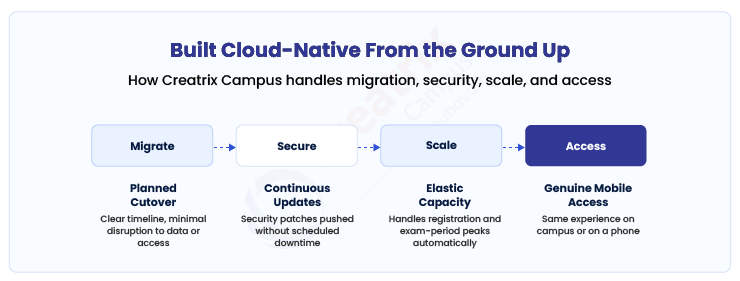
Creatrix Campus is built as a cloud-native platform from the ground up, not a legacy application hosted on rented servers and relabeled as cloud-based.
Security and feature updates are pushed continuously without requiring an institution's IT team to schedule downtime. Capacity scales automatically during registration and exam periods, the moments legacy on-premise systems are most likely to struggle. Mobile and remote access work the same way for a student on a phone as for staff at a campus desktop, because the platform was designed for that from the start rather than adapted to it afterward.
The practical effect for an institution considering a migration is that the move away from legacy software addresses the actual risk, aging security posture, ending vendor support, staff dependency on undocumented systems, rather than just shifting the same application to a different server.
Conclusion
Most institutions know, in general terms, that their legacy system should eventually move to the cloud. Very few treat it as urgent, because the old system still runs today, and the case for migration usually gets made on cost savings that do not feel pressing yet.
The more accurate case is about risk, not cost: aging security patches, vendor support that eventually ends, and institutional knowledge that leaves with retiring staff. Institutions that evaluate a cloud migration for what it actually delivers afterward, continuous updates, elastic capacity, real mobile access, make a better decision than those evaluating only the up-front cost of the move.
If you want to see how Creatrix Campus delivers a genuinely cloud-native platform instead of a legacy system relabeled as cloud-hosted, talk to us about moving off legacy software.
Quick recap
The case for a cloud-based education platform is usually made on cost, but the more urgent case is risk: legacy on-premise systems accumulate slowly growing exposure to security gaps, ending vendor support, and staff dependency on undocumented systems. A genuinely cloud-native platform delivers continuous security updates, elastic capacity during peak periods, and real mobile access, not just a hosted copy of the same legacy software. Institutions that evaluate for what happens after the migration make a better decision than those focused only on up-front cost.
Frequently asked questions
Is a hosted legacy system the same as a cloud-based platform?
Why do institutions delay migrating off legacy software?
What should institutions look for beyond lower server costs when evaluating a cloud migration?
How does Creatrix Campus handle cloud migration?
Join the conversation
Want to contribute?
We welcome thought leaders to share ideas and write for our blog.
Become a guest author