
On this page
Walk into most college administration buildings and you will find four different tools running in parallel, none of them talking to each other. Administration runs on one system. The library runs its own catalog and circulation software. Departments track projects and tasks in whatever tool a manager picked, a spreadsheet, a shared board, an email chain. Events, orientation, workshops, guest lectures, run through a separate booking and registration process.
Each of these tools does its narrow job well enough. None of them share a directory of staff and students, a calendar, or a reporting layer. A librarian cannot see whether a student flagged for academic risk exists on their engagement radar. A department head running a curriculum project cannot see whether the room they need is already booked for an event. Administration cannot pull one report that reflects what is actually happening across the institution today.
Campus operations software has to work across four commonly separated areas: administration, library management, project and workflow coordination, and event management. What actually improves institutional efficiency is whether these run as one connected system instead of four disconnected ones.
Quick answer
Campus operations software covers the administrative tools that keep an institution running day to day: general administration and workflow, library cataloging and circulation, project and task management for departments, and event registration and logistics. The version that actually improves institutional efficiency connects these to a shared staff and student directory, a shared calendar, and shared reporting, so a change in one area, a room booking, a staff role, a project deadline, is visible everywhere it matters instead of living inside one isolated tool.
Article summary
Modernizing campus operations raises four related questions: what cloud and mobile access should do for general administration, what a modern library management system should include, how project and task tracking should work for academic departments, and what event management software needs to handle beyond a simple registration form. The real gain is not digitizing each of these separately. It's connecting them so operations run as one coordinated system.
Key takeaways
- Campus operations software usually digitizes administration, library, projects, and events as four separate tools that do not share a directory, calendar, or reporting layer.
- The cost of that separation shows up as duplicated staff work, calendar conflicts, and reports that leadership has to manually assemble from multiple sources.
- Library management, project coordination, and event logistics each have their own specific requirements, but all three benefit from sitting inside the same operational record as general administration.
- ACRL, the largest division of the American Library Association representing nearly 8,500 academic library professionals, and EDUCAUSE, the nonprofit focused on technology and data in higher education, both reflect how much specialized coordination each of these operational areas actually requires.
- The institutions that get the most value connect these four areas to one shared system, rather than evaluating and buying each one in isolation.
What Is Campus Operations Software?
Campus operations software is not one product category so much as four adjacent ones that institutions typically buy separately. General administration software handles cloud and mobile access to core institutional workflows, staff records, approvals, internal communications. Library management software handles cataloging, circulation, RFID-based checkouts, and digital resource access. Project and workflow management software gives academic departments a way to track tasks, deadlines, and accountability across a project, a curriculum revision, an accreditation cycle, a facilities upgrade. Event management software handles registration, venue booking, attendee tracking, and logistics for everything from orientation week to a guest lecture series.
Each of these has genuine, specific requirements. A library needs cataloging standards and RFID integration that a generic administration tool will never handle well. A department running a multi-month project needs task tracking and accountability that a library system was never built for. Event logistics need venue and attendee management that neither of the other two really touches.
What ties them together is not that they should be the same tool, it is that they should not be four disconnected ones. A shared staff and student directory, a shared institutional calendar, and reporting that pulls from all four areas are what turn four adjacent tools into one operations layer.
Why Four Separate Tools Cost More Than One Connected System
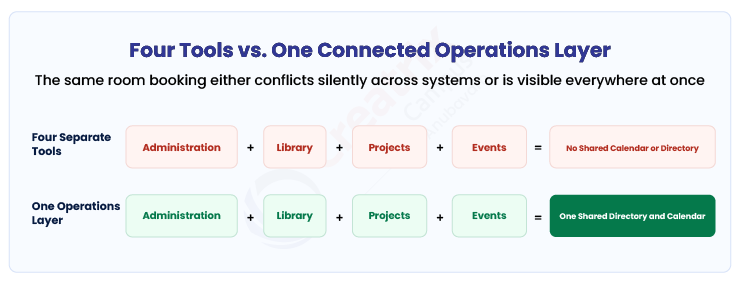
Here is a simple test: can a department head see, from one place, whether a room is free for a project meeting, whether that room is already booked for a campus event, and whether the library has reserved it for an exam period? In most institutions, the honest answer is no. Each of those bookings lives in its own system, and finding out means checking three calendars or asking three different offices.
That same fragmentation shows up in smaller ways constantly. A staff member's role changes, and someone has to update it in the administration system, then remember to update library access permissions separately. A project deadline slips, and the only way leadership finds out is if someone manually reports it, because the project tool has no connection to the administrative reporting layer that goes to the provost's office.
ACRL, the Association of College and Research Libraries, represents nearly 8,500 individuals and libraries and describes itself as the largest division of the American Library Association, working to help those in academic libraries "learn, innovate, and lead within the academic community," per ACRL's own site. An association of that scale and focus exists because running an academic library well is a specialized discipline in its own right, one that a generic administration tool cannot absorb, but one that still needs to connect to the rest of campus operations rather than sit apart from it.
EDUCAUSE, the nonprofit association with more than 100,000 individual members and 2,100 member institutions focused on the use of technology and data in higher education, exists for a related reason, per EDUCAUSE's own site: institutions keep needing outside benchmarking on how to actually coordinate technology and operations across departments, which reflects how often that coordination breaks down when each area buys and runs its own separate system.
| Approach | What day-to-day operations look like | Where it breaks down |
| Four separate tools (administration, library, projects, events) | Each team manages its own system, works reasonably well in isolation | No shared calendar or directory, manual cross-checking before any institution-wide report |
| Digitized individually, still disconnected | Faster within each tool, still four separate logins and data sets | Staff and room conflicts go unnoticed until someone manually checks multiple systems |
| One connected operations layer across all four areas | A change in one area (a room booking, a role change) reflects everywhere instantly | Requires evaluating for shared directory and calendar integration, not just each tool's individual feature list |
What to Look For Across Administration, Library, Projects, and Events
Every vendor in each of these four categories can demonstrate their core feature set well. A library vendor can show cataloging and RFID checkout. A project tool can show task boards and deadlines. An events tool can show a registration form. None of that tells you whether these will operate as one coordinated system or four more logins.
A useful decision framework asks what happens at the seams, not just within each tool. Does a room booked for an event automatically block that room in the project and library calendars. Does a staff role change in administration propagate to library access permissions without a second manual update. Can a provost pull one report that reflects project status, library usage, and event activity without asking four different offices for their numbers.
| Capability | Why it matters | What to ask a vendor |
| Shared staff and student directory | Prevents duplicated records and permission mismatches across administration, library, and events | Ask whether a role or access change in one area updates automatically everywhere else |
| Shared institutional calendar | Prevents room and resource double-booking across projects, library reservations, and events | Ask for a live demo showing a room booked for an event automatically blocking it elsewhere |
| Cross-area reporting | Leadership needs one view of operations, not four separate exports to assemble by hand | Ask how a report combining project status, library usage, and event activity is generated |
| Category-specific depth (cataloging, task tracking, venue logistics) | Each of the four areas has real requirements a generic tool will not handle well | Ask how the platform handles the specific standard or workflow unique to that area, not just the general dashboard |
If a vendor's pitch is entirely about one area, library cataloging, or event registration, in isolation, ask directly how it connects to the rest of campus operations. If the answer is a separate integration project, that is a sign the four areas will keep operating as four separate systems in practice.
Where Creatrix Campus Fits
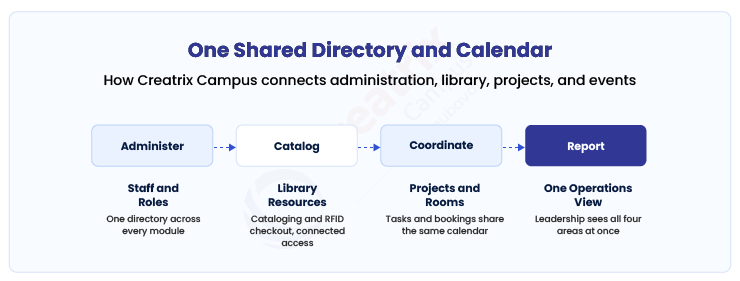
Creatrix Campus runs administration, library management, project and workflow coordination, and event management on the same underlying staff and student directory and the same institutional calendar, rather than as four bolted-together modules.
A room booked for an event is visible to whoever is scheduling a project meeting or a library exam session, because all three draw from the same calendar. A staff member's role change in administration updates their library and project access without a second manual step. Library cataloging, RFID checkout, project task tracking, and event registration each keep the specific depth their category needs, while all of it feeds the same institutional reporting layer.
The practical effect is that a provost or dean can pull one operational view, project status, library activity, event calendar, staffing, without asking four offices to each send their own report. Staff spend less time reconciling calendars and directories by hand, and more time actually running the operations those tools were bought to support.
Conclusion
Most institutions buy administration, library, project, and event tools as four separate decisions, each evaluated on how well it handles its own narrow job. Each of those evaluations is reasonable on its own terms. What it misses is the cost of the seams between them: duplicated directories, calendar conflicts, and reports leadership has to manually assemble from four different sources.
The institutions that get real value from campus operations software are the ones that evaluate for the connection between these four areas specifically, a shared directory, a shared calendar, and reporting that spans all of them, not just each tool's individual feature list.
If you want to see how Creatrix Campus runs administration, library, projects, and events on one shared directory and calendar instead of four disconnected systems, talk to us about connected campus operations.
Quick recap
Campus operations software usually digitizes administration, library management, project coordination, and event logistics as four separate tools, each competent in isolation but disconnected from the others. The real cost shows up at the seams: duplicated staff directories, calendar conflicts over shared rooms, and reports leadership has to manually assemble from multiple systems. The institutions that get the most value connect these four areas to one shared directory, calendar, and reporting layer, while still preserving the category-specific depth each area genuinely needs.
Frequently asked questions
What is campus operations software?
Should administration, library, project management, and event tools be the same software?
What is the real cost of running these four areas as separate systems?
What should institutions look for when evaluating campus operations software?
How does Creatrix Campus handle campus operations?
Join the conversation
Want to contribute?
We welcome thought leaders to share ideas and write for our blog.
Become a guest author