
On this page
Most automation projects in universities succeed. That is the problem.
They succeed at making the old process faster. The paper form becomes a web form with the same fourteen fields. The email chain becomes a workflow with the same four approvals. The rule that nobody can explain now runs in half a second. Speed arrives, and everything the process already got wrong arrives with it.
This guide is for registrars, provosts, CIOs and anyone who signs off an automation project. It argues one thing: automation does not remove decisions, it moves them into the system, so the work is to make those decisions deliberately before you choose any software.
Quick answer
Automation in higher education is the use of rules, workflows and, increasingly, AI to carry out institutional processes without manual steps. It works when each automated step has a written rule with an owner, one trusted record, a defined path for exceptions, an explanation for every outcome and a named person who answers for the result.
Article summary
This guide explains what automation means in 2026, five ways it goes wrong, a four-level ladder for deciding what to automate, five questions to ask first, a worked example, and where governed workflows help.
Key takeaways
- Automating a process as it stands carries its old rules, gaps and silos forward at higher speed. Redesign first.
- Automation moves a decision into the system. Someone still has to own the rule and answer for the outcome.
- Choose a level before you choose a tool: assist, automate with approval, automate with audit, or keep it human.
- Exceptions decide whether automation works. Every exception type needs an owner, a deadline and an escalation.
- Measure outcomes, such as time to decision and exceptions left open, not whether the automation is switched on.
What Automation Means in 2026
In 2015, automation in education meant doing familiar tasks with a click: admissions, attendance, grades, fee reminders. The question was whether to move from paper to software, and increasingly to the cloud.
That question is settled. The question now is different, because the systems do more than record and remind. They route cases, decide eligibility, flag students, draft letters, and with AI they recommend and sometimes act. When a system acts on the institution's behalf, it is carrying the institution's policy. If the policy is unclear, outdated or contradicted by another department, the automation does not fix that. It applies it, consistently and at scale.
So the leader's question has changed from "can we automate this?" to "should we, at what level, and who answers when the system is wrong?"
Five Ways Automation Goes Wrong
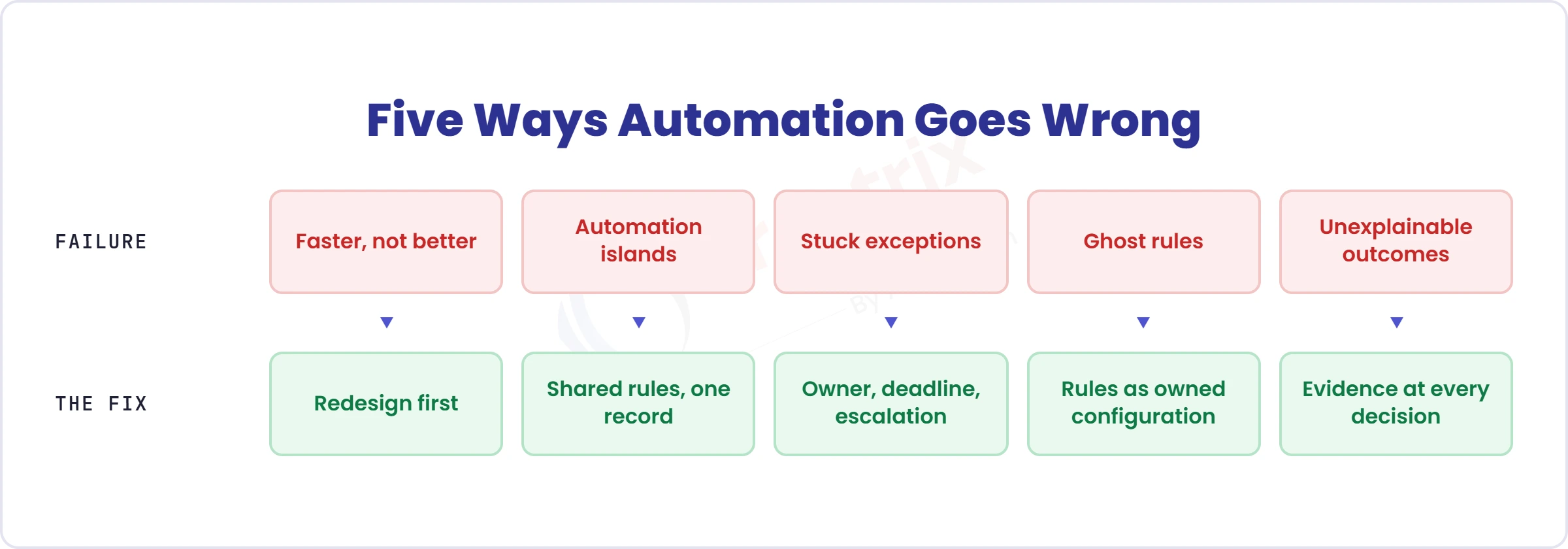
Five failures account for most disappointing automation.
| Failure | What it looks like | Why it happens | The fix |
| Faster, not better | A paper process becomes a digital one with the same steps | The process was automated as it stood | Redesign first: if we started again, would we build it this way? |
| Automation islands | Each system automates its own corner, and the handoffs between them stay manual | Tools were bought one problem at a time | Automate across the lifecycle, on shared rules and one record |
| Stuck exceptions | Easy cases fly through, and hard ones pile up unseen | No exception path was designed | A named owner, a deadline and an escalation for each exception type |
| Ghost rules | Rules live in scripts, macros or one person's memory | Rules were coded or never written down | Rules held as configuration, versioned and owned |
| Unexplainable outcomes | Nobody can say why a case went the way it did | No record of the rule, the data or the approver | Evidence captured at every decision |
The Automation Ladder
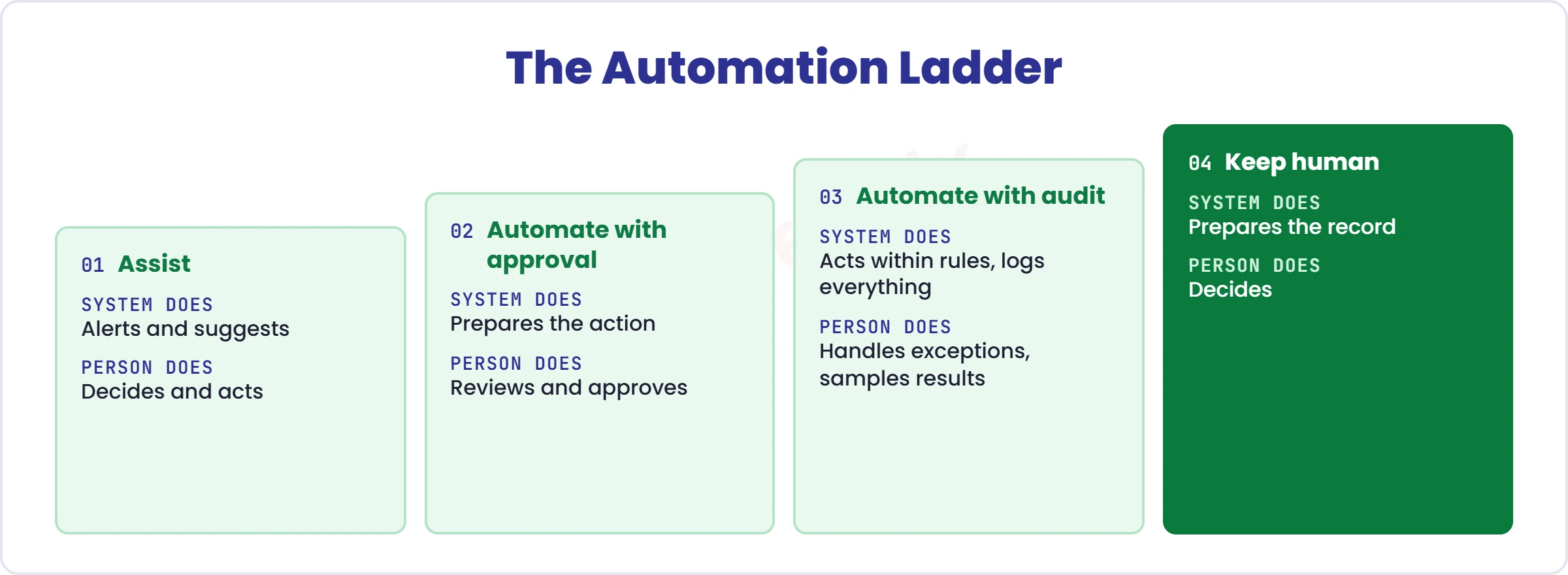
Before choosing a tool, choose the level. Each level changes who does what, and who answers.
| Level | What the system does | What a person does | Fits | Example |
| 1 Assist | Alerts and suggests | Decides and acts | High judgement, early signals | An alert tells an advisor a student has missed several sessions |
| 2 Automate with approval | Prepares the action | Reviews and approves | Consequential but repeatable | Offer letters are drafted from the decision record and approved before release |
| 3 Automate with audit | Acts within rules, logs everything | Handles exceptions, samples results | Rule-based, high volume | Registration eligibility is checked against prerequisites and holds, with exceptions sent to a named reviewer |
| 4 Keep human | Prepares the record | Decides | High stakes, contested, unique | Misconduct findings, borderline admissions, appeals |
Most institutions should start at level 1 or 2 and earn level 3 with evidence. A process moves up when its rules have been stable, its exceptions are understood and its outcomes have been checked.
Five Questions Before You Automate
Ask these before you automate anything. A red flag on any of them means fix the process first.
- Is the rule written down, and does someone own it? Red flag: "it is how we have always done it", or the rule lives in a spreadsheet macro.
- Is there one record or three copies? Red flag: the project is a sync between two spreadsheets.
- What happens to the exceptions? Red flag: no named owner, deadline or escalation for the cases that do not fit.
- Can we explain any outcome, in two minutes, to the person affected? Red flag: "the system decided".
- Who answers when it is wrong, and how do we reverse it? Red flag: no override path and no log of who changed what.
A Worked Example: Graduation Clearance
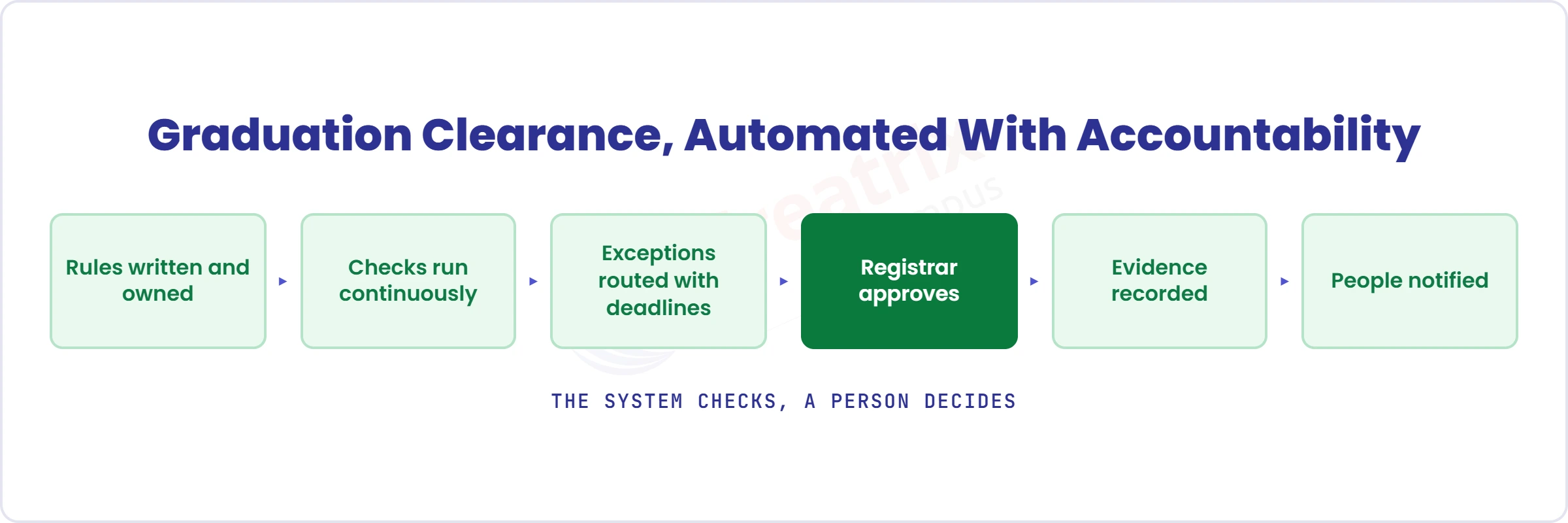
Take graduation clearance. Before, the registrar's team emails finance, academic departments and others for each prospective graduate, collects replies and updates a spreadsheet. The list is only as current as the last email.
Here is how the five questions change it.
- Write the rules. Graduation requires a completed degree audit, financial clearance and no unresolved holds. A named policy owner holds them.
- Run the checks continuously, not once at the deadline, against the single student record.
- Route exceptions. A missing credit or an unpaid balance goes to a named owner with a deadline and an escalation.
- Keep a person on the decision. The registrar reviews the list and approves, and people settle edge cases.
- Record the evidence. Each clearance stores the rule version, the data used and the approver, so any outcome can be explained later.
- Tell people as things change. Students and staff are notified at each step.
What to measure: days from the last exam to an approved list, exceptions open past their deadline, overrides, and students told late. Notice that none of these is "automation switched on".
Where Creatrix Campus Fits
In Creatrix Campus, automation is part of how the lifecycles work, not a layer bolted on top. The platform provides a workflow and business process engine, a business rules engine, task and approval management, workflow automation, low-code integration and robotic process automation. Each lifecycle then uses them for its own processes: degree audit and graduation clearance in Student Success & Records, financial holds from Student Financials, admissions workflow in Student Recruitment & Enrollment, policy approval in Academic Governance.
Four principles shape how it behaves. Rules over custom code: institutions change rules by configuration, not redevelopment. State awareness: every record is in a defined state, and transitions are explicit, logged and reversible only with authority. Evidence by design: evidence is created when a decision is made, not rebuilt afterwards. And for AI: data before models, governance before automation, assistance before autonomy, so institutions choose whether a capability alerts, recommends or acts, and every AI suggestion carries a human approval step.
Anubavam, the company behind Creatrix Campus, works with universities across different markets, and the pattern repeats: the technology is rarely the hardest part. Agreeing the rules, the owners and the exceptions is. Where an institution already runs automation in other tools, Creatrix Connect links them, so rules and evidence are not scattered.
Conclusion
Automation is a good servant and a poor decision-maker. Used well, it gives staff their time back and gives students faster, more consistent answers. Used carelessly, it spreads yesterday's confusion more efficiently. Start with the rule, the exception and the person who answers, and the software becomes the easy part.
If you want to see how a process such as graduation clearance would run on one governed record, talk to us about a Tailored Proof Session.
Quick recap
Redesign before you automate. Choose a level. Ask five questions. Measure outcomes, not deployment.
Frequently asked questions
What is automation in higher education?
What should universities automate first?
What should not be automated?
What is the difference between automation and AI?
How do you keep automation accountable?
How does Creatrix Campus approach automation?
Join the conversation
Want to contribute?
We welcome thought leaders to share ideas and write for our blog.
Become a guest author