

On this page
Most university software evaluations begin with a feature list. That may be exactly where the problem starts. A product can satisfy every requirement on the list and still leave the institution with another system that faculty, administrators, data teams, and leadership have to stitch together themselves.
Quick answer
Before buying higher education software, evaluate the institutional problem it solves, how it connects to systems you are keeping, what happens to your data, whether governance and workflows fit how your institution actually runs, and what the technology leaves behind operationally once it goes live.
Article summary
The old procurement checklist asks whether software has the right features, mobile access, and support. Those questions are not wrong, but they no longer separate good decisions from costly ones. This article replaces them with ten sharper questions built around one test: does this technology reduce institutional fragmentation, or add to it?
Key takeaways
- A product can pass every feature comparison and still create another disconnected system.
- Integration readiness matters more than confirming that APIs exist.
- Data migration, governance fit, and internal implementation effort often decide outcomes more than the vendor's timeline.
- Total cost of ownership includes integration, migration, support, and internal effort, not just license price.
- The strongest evaluation question is whether the software reduces fragmentation or adds to it.
Start With the Problem, Not the Product
1. What institutional problem are we actually trying to solve?
Before comparing vendors, separate the business problem from the software category. A registrar's office chasing a scheduling tool and a provost's office chasing better outcomes data may both end up evaluating the same product for different reasons, and that mismatch shows up later as scope creep.
2. Which academic workflows need to connect?
Look past individual features to the lifecycle or process the software touches. A curriculum tool that never talks to scheduling, or a CRM that never talks to student records, solves a narrow task while leaving the surrounding workflow exactly as fragmented as before.
Test for Fit, Not Just Features
3. How will it work with the systems we are keeping?/strong
Most institutions are not replacing their SIS, ERP, or LMS. Integration readiness means more than confirming an API exists. It means knowing what data actually needs to move, how often, and who is responsible when that connection breaks.
4. What happens to our existing data?
Ask about migration, ownership, data quality, field mapping, and historical records before signing anything. A vendor who cannot answer this clearly in the sales process usually cannot answer it cleanly during implementation either.
5. Can governance and workflows reflect how our institution actually operates?
Every university has its own approval chains, academic structures, and policy exceptions. Software that only supports one rigid workflow forces staff into manual workarounds within weeks of launch, which quietly recreates the fragmentation the purchase was meant to fix.
6. What will implementation really require from our people?
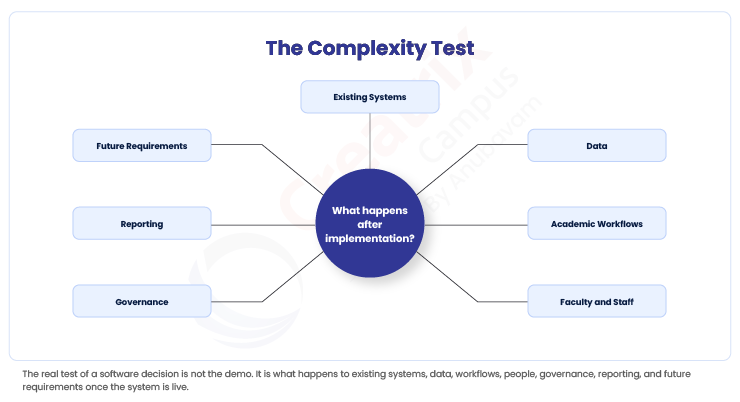
Vendor timelines describe the vendor's work. They rarely describe the internal effort: process decisions, data preparation, testing, and training that your own staff have to complete regardless of how fast the vendor moves.
Look Past Go-Live
7. Will people actually use it?
A system with strong specifications and low adoption delivers close to nothing. Usability, role relevance, and workflow fit matter more than any feature checklist, because a workaround that staff prefer over the new system defeats the purchase entirely.
8. Can it grow with the institution without creating another replacement project?
Consider new campuses, programmes, lifecycles, and regulatory changes several years out, not just current headcount. Software that scales only in user count, not in institutional complexity, tends to need replacing again sooner than expected.
9. What is the real total cost of ownership?
License price is the visible number. Implementation, integration, migration, support, customization, and future expansion are the ones that actually determine the total. According to EDUCAUSE, the Higher Education Community Vendor Assessment Toolkit exists precisely because institutions were managing so many inconsistent, one-off vendor evaluations that a shared standard became necessary to compare cybersecurity, privacy, and compliance posture across vendors on equal footing.
A Better Question Than the Feature List
10. Will this reduce institutional fragmentation or add to it?
This is the question that matters most. A system can check every box on questions one through nine and still become one more application that leadership, faculty, and data teams have to reconcile manually. The strongest purchase decision is the one where the technology becomes part of how the institution operates, not one more thing operating alongside it.
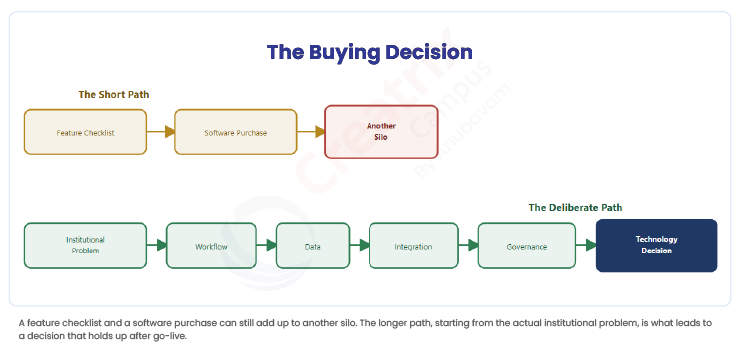
Here is a quick comparison of how the old checklist questions compare to the sharper versions worth asking instead.
| Typical Buying Question | Better Question to Ask | Why It Matters |
| Does it have APIs? | What data and workflows must move between this system and the systems we are keeping? | API availability does not guarantee useful interoperability. |
| How quickly can it go live? | What must our institution resolve before implementation can succeed? | Internal readiness affects timelines as much as vendor speed. |
| What does it cost? | What will it cost to implement, integrate, operate, support, and expand? | License price is only part of the decision. |
| Is it customizable? | Can governance and workflows be configured without creating fragile workarounds? | Customization and sustainable configuration are not the same thing. |
| Is it scalable? | Can it support future programmes, campuses, lifecycles, and institutional complexity? | More users is only one form of scale. |
Where Creatrix Campus Fits
Most universities already run an SIS, an ERP, and an LMS, and none of that needs to be replaced to fix fragmentation. Creatrix Campus operates as the connective layer across academic planning, delivery, quality, operations, student success, and institutional intelligence, so workflows, governance, and evidence can work coherently across the systems an institution already has, rather than requiring one more standalone application layered on top.
This is not a claim that Creatrix Campus replaces every SIS, ERP, or LMS an institution runs. It is a claim about what happens between those systems: whether a curriculum change, a scheduling decision, or an accreditation requirement can move across them without someone manually reconciling the gap. Institutions exploring this often start by looking at how platform, data, and AI connect existing systems, and at the broader Academic Operating System concept behind that connective layer.
Conclusion
The best software decision is not the product that wins the feature comparison. It is the one that reduces the amount of institutional complexity your people have to manage afterward. If your team is weighing that question right now, you can request a demo to see how the fit actually plays out against your own systems.
Quick recap
Feature checklists rarely predict what happens after implementation. The questions that matter most cover institutional fit, integration readiness, data continuity, internal implementation effort, and true total cost. The strongest test of all is whether the software reduces fragmentation or quietly adds to it.
Frequently asked questions
What is the most overlooked question when buying higher education software?
Does total cost of ownership matter more than license price?
Should universities always replace their existing SIS or ERP when adopting new software?
Join the conversation
Want to contribute?
We welcome thought leaders to share ideas and write for our blog.
Become a guest author