
On this page
An applicant submits her application on Monday. By Wednesday, admissions has made an offer, but finance has no record of a deposit and the registrar has no record of a student. Someone exports a spreadsheet to bridge the gap.
A student recruitment CRM is supposed to prevent exactly that. In 2021, an outdated CRM meant paper forms and queues. In 2026, the signs are subtler: the CRM works, but it stops at the application, and everything after it is retyped.
This guide is for admissions and enrolment leaders, and the IT leads who support them. It gives six signs, each with a test you can run this week and a measure to track, and a table for deciding whether to extend your CRM or replace it. For the strategies a connected CRM supports, read our Top 10 Student Recruitment Strategies.
Quick answer
A student recruitment CRM is outdated when it cannot take an applicant from enquiry to student record without re-entry: it stops at the application, shows totals but not where applicants are lost, keeps campuses and agents in separate lists, and relies on manual follow-up, manual processing or paper. The fix may be extending your CRM, not replacing it.
Article summary
This guide explains what outdated means for a recruitment CRM in 2026, six warning signs with a test and a measure for each, and a decision table for extending or replacing it.
Key takeaways
- A CRM can be digital and still outdated if it stops at the application. That sign costs the most.
- Each of the six signs can be tested in a day, with one applicant, one report or one week of data.
- Separate lists for campuses and agents, and reports without conversion by stage, hide where applicants are lost.
- Paper, email and manual follow-up are the oldest signs, and still the most visible.
- A warning sign does not always mean replacement. Often the first move is to connect your CRM to admissions and the student record.
What “Outdated” Means in 2026
Recruitment software has not stood still. Applications moved online, portals appeared, and notifications became automatic. So an outdated CRM today is rarely a paper problem alone.
The more expensive failure is lost context. An enquiry becomes an application, an application becomes an offer, an offer becomes a student, and at each step someone re-enters the details. Every re-entry is a delay, and every delay is a chance for the applicant to choose another institution.
The six signs below are ordered from the most costly to the most visible. Run each test with the people who use the CRM every day. One afternoon is enough.
Signs 1 to 3: The Ones That Cost the Most
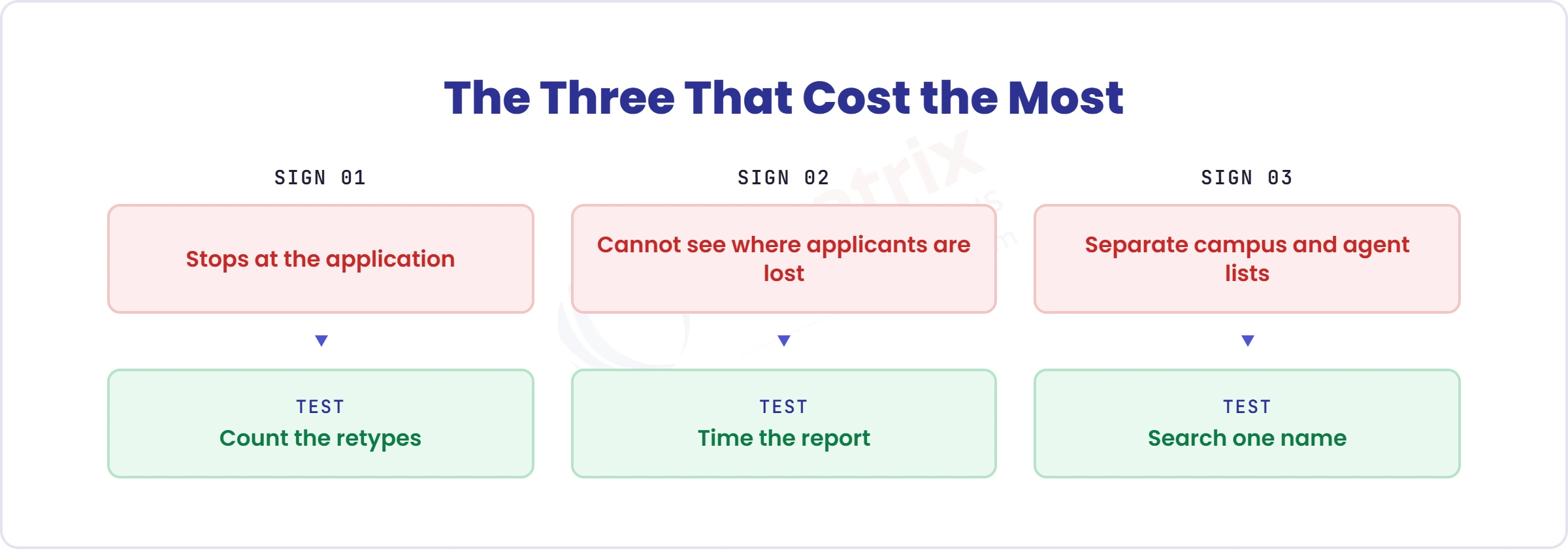
Sign 1: Your CRM stops at the application. Offers, deposits, acceptances and the student record are created elsewhere and retyped. Context is lost at the moment it matters most. Test: follow one accepted applicant from enquiry to student record and count how many times someone retypes their details. Measure: re-entries per applicant, and days from acceptance to student record.
Sign 2: You cannot see where applicants are lost. Reports show totals, not conversion by stage, source and programme, so nobody can say whether the problem is marketing, follow-up or the application itself. Test: ask for yesterday’s conversion by source and programme, and time how long the answer takes. Measure: time to produce the report, and stages with no visible conversion rate.
Sign 3: Campuses, regions and agents live in separate lists. The result is duplicate prospects, unclear ownership, and agent leads that no one follows up because two people think the other has them. Test: search one applicant’s name across campus and agent lists and count the records. Measure: duplicate prospect rate, and leads with no owner.
Signs 4 to 6: The Ones You Can See
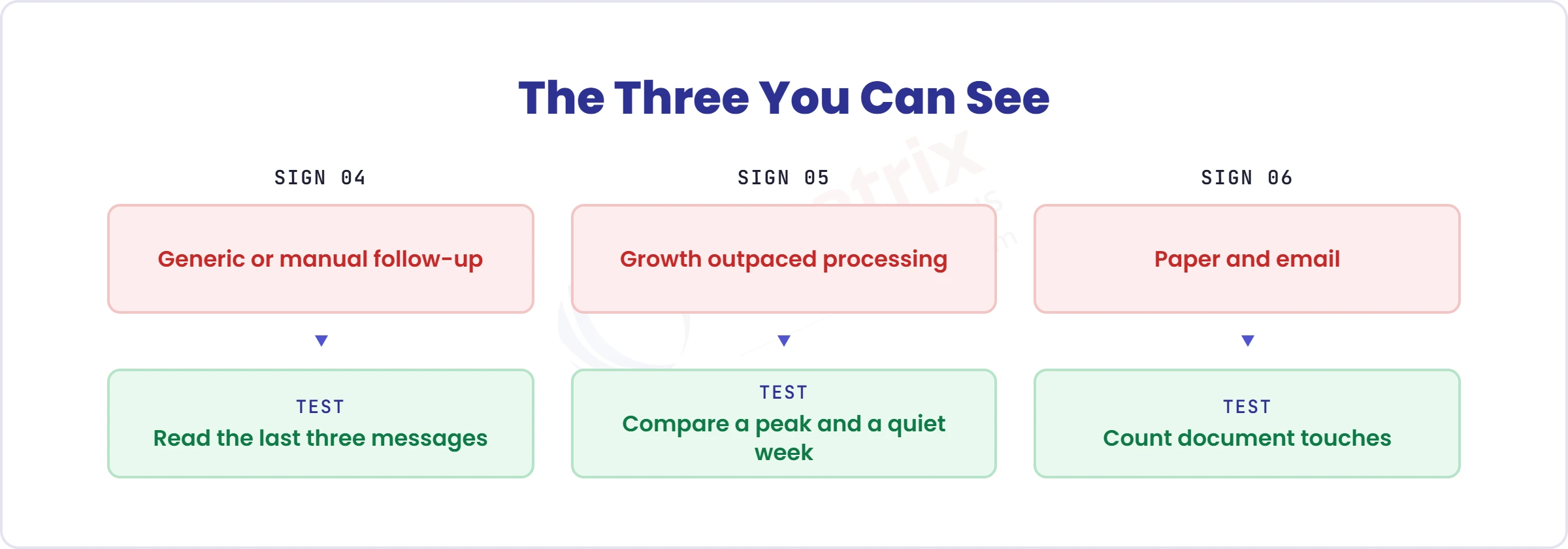
Sign 4: Follow-up is generic or manual. Bulk emails go to everyone, status updates are sent by hand, and a brochure download gets the same message as an applicant two pages from submitting. A current system sends notifications and alerts by email, SMS and push message at each stage, tailored by programme and stage. Test: look at the last three messages sent to one applicant. Did they differ by programme and stage? Measure: share of messages sent automatically at stage changes, and time to first reply.
Sign 5: Growth has outpaced manual processing. At low volumes, assigning applications to reviewers, checking selection criteria, tracking status and scheduling interviews can rest on a few people and a spreadsheet. At peak it cannot. Configurable workflows should route each application and keep every document in one place. Test: compare staff time per application in your busiest week with a quiet one. Measure: time to first decision at peak.
Sign 6: Applications and documents still move on paper or email. Queues for forms, details retyped from paper and documents chased by email are the oldest signs, and still the most visible. If applicants cannot apply online, upload documents and see their status, staff are doing the system’s job. Test: take one application and list every time a person touches a document before it is complete. Measure: touches per application, and applications waiting on documents.
Extend or Replace?
A warning sign does not always mean replacement. Use this table to decide.
| Your situation | Likely move | Why |
| The CRM handles enquiries, campaigns and events well, but applications, offers and the student record are retyped | Keep it for pre-application engagement and connect it to admissions through a governed handoff | You keep what works and remove the retyping |
| The CRM cannot manage applications, documents, decisions or offers | Move those stages to a native admissions CRM | The gap is structural |
| Several CRMs across campuses or agents | Consolidate on one applicant record | Duplicates and ownership disputes |
| The CRM is fine, but nobody uses it | Fix process, training and ownership before replacing | A new tool will not fix adoption |
For a step-by-step approach to connecting or replacing, see our Integrating CRM for Admissions guide.
Where Creatrix Campus Fits
Creatrix Campus Admissions CRM is available as a standalone product or as part of Student Recruitment & Enrollment. It manages leads, campaigns, events, enquiries and nurturing, plus networks of counsellors, agents and partners; applications, documents, interviews, decisions and offers; and acceptance, enrollment and student ID creation. When a student matriculates, the student record is created from the same data, so nothing is retyped.
Where an institution already runs a CRM it values, Creatrix connects to it and takes over from application onward through a governed handoff, so the first sign in this guide is fixed without replacing what works.
Conclusion
An outdated CRM rarely fails loudly. It fails in the handoffs, one retyped detail at a time. Run the six tests, put the numbers in front of the person who decides, and choose to extend or replace on evidence.
If you want to see where your own journey loses context, talk to us about a Tailored Proof Session.
Quick recap
A recruitment CRM is outdated when it stops at the application or cannot show where applicants are lost. Run the six tests, then extend or replace on evidence.
Frequently asked questions
What is a student recruitment CRM?
How do I know if my admissions CRM is outdated?
How can I check whether my CRM stops at the application?
Should we replace our CRM or integrate it?
What should an admissions CRM manage beyond leads?
How does Creatrix Campus handle recruitment and admissions?
Join the conversation
Want to contribute?
We welcome thought leaders to share ideas and write for our blog.
Become a guest author